# As a condition of accessing this website, you agree to abide by the following
# content signals:
# (a) If a Content-Signal = yes, you may collect content for the corresponding
# use.
# (b) If a Content-Signal = no, you may not collect content for the
# corresponding use.
# (c) If the website operator does not include a Content-Signal for a
# corresponding use, the website operator neither grants nor restricts
# permission via Content-Signal with respect to the corresponding use.
# The content signals and their meanings are:
# search: building a search index and providing search results (e.g., returning
# hyperlinks and short excerpts from your website's contents). Search does not
# include providing AI-generated search summaries.
# ai-input: inputting content into one or more AI models (e.g., retrieval
# augmented generation, grounding, or other real-time taking of content for
# generative AI search answers).
# ai-train: training or fine-tuning AI models.
# ANY RESTRICTIONS EXPRESSED VIA CONTENT SIGNALS ARE EXPRESS RESERVATIONS OF
# RIGHTS UNDER ARTICLE 4 OF THE EUROPEAN UNION DIRECTIVE 2019/790 ON COPYRIGHT
# AND RELATED RIGHTS IN THE DIGITAL SINGLE MARKET.
# BEGIN Cloudflare Managed content
User-agent: *
Content-Signal: search=yes,ai-train=no
Allow: /
User-agent: Amazonbot
Disallow: /
User-agent: Applebot-Extended
Disallow: /
User-agent: Bytespider
Disallow: /
User-agent: CCBot
Disallow: /
User-agent: ClaudeBot
Disallow: /
User-agent: CloudflareBrowserRenderingCrawler
Disallow: /
User-agent: Google-Extended
Disallow: /
User-agent: GPTBot
Disallow: /
User-agent: meta-externalagent
Disallow: /
# END Cloudflare Managed Content
WebCLI — Agent Interface Device for the World Wide Web
You don't have to drive every web task yourself anymore. Tell your agent what you need done.
WebCLI is for contact with reality — when your agent must inspect an unknown page, decide what to do, act, recover from blockers, and pause for a human when the web needs one.
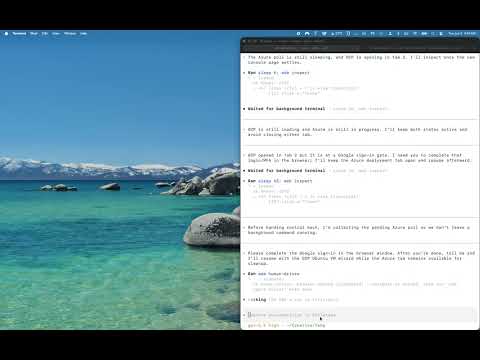
{ "events": ["redacted transcript with blocker, pause, and resume recorded"] }
Agents code. They even search. But the second they try to do something on the web, they go blind.
Real work still happens on websites: dashboards, portals, auth flows, admin pages, and changing UIs. WebCLI is for contact with reality — when an agent must inspect, decide, act, recover, and sometimes pause for human help.
Three clouds. One browser loop.
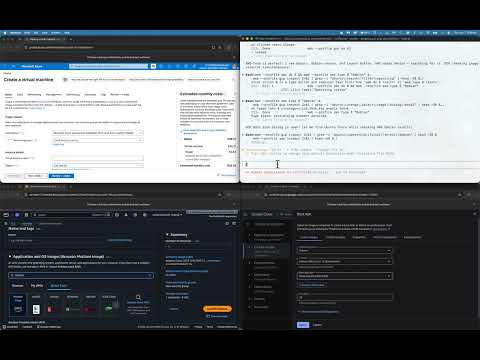
Agents drove Azure, AWS, and GCP through the browser.
No cloud SDK script. No prewritten Playwright flow. Just real cloud consoles, operated through WebCLI.
Full Self Browsing has been achieved.
▶ Play
Azure, AWS, and GCP
Three clouds. One browser loop.
Codex creates and deletes VMs across Azure, AWS, and GCP. No SDK scripts. No prewritten Playwright flows. Real cloud consoles, operated through WebCLI.
Azure Portal (Fluent UI, dynamic blades, VM creation)
A full session: Claude reads the spec gists, rewrites all site copy, builds the HTML, and deploys to Cloudflare Pages — then uploads this recording to YouTube. No wrangler. Portal only.
Reads spec from GitHub Gists
Rewrites copy, builds HTML, deploys via Cloudflare dash
Humans get GUIs. Programs get APIs. Agents need TAIs.
WebCLI is a Textual Agent Interface for the browser: structured state, numbered actions, tabs, profiles, blockers, handoff, and transcripts.
The web has human interfaces. Now it has an agent interface. WebCLI translates messy live websites into the language agents already understand: observable state, numbered actions, browser context, blockers, and transcripts.
The browser was built for viewing. WebCLI is built for doing.
Pages become observable state.
Buttons and fields become numbered actions.
Tabs, frames, dialogs, popovers become inspectable browser surfaces.
Passkeys, MFA, file choosers, ambiguity become blockers and handoff.
Agent/browser history becomes redacted transcript.
The human web
Agentish
Visible page and browser context
→
structured state
Buttons, links, inputs, menus
→
numbered actions
Tabs, frames, dialogs, popovers
→
inspectable browser surfaces
Passkeys, MFA, file choosers, ambiguity
→
blockers and handoff
Agent/browser history
→
redacted transcript
Automation veterans
XPath was character-building. You can stop now.
Stop writing selectors for websites your agent can figure out.
Use Playwright when you know the script. Use WebCLI when the agent has to figure out the website.
Scripts replay. Agents adapt.
Your automation script worked perfectly. Until the div moved.
The DOM is not the user interface.
Not scripted. Driven.
Use scripts for known paths. Use WebCLI when the path changes.
Not test automation. Web operation.
The agent loop
Not scripted. Driven.
WebCLI works best as a live browser loop. Observe the page. Choose one next action. Act. Observe again. Recover when the page changes. Pause when the web needs a human. Keep the transcript.
Do not chain the whole browser workflow into one brittle command. Use WebCLI interactively, step by step.
01
Observe
Read current page state, visible text, forms, actions, tabs, and blockers.
02
Choose
Pick from numbered actions instead of inventing selectors or coordinates.
03
Act
Click, type, submit, choose, press, scroll, or navigate from the terminal.
Pause cleanly when human judgment is required. Join the session, fix it, then resume.
06
Transcript
Record redacted command history. Audit exactly what happened.
Not just a CLI. An agent skill.
One command. Every agent knows the loop.
WebCLI ships as a structured SKILL.md — the full browser loop in a form coding agents can read and immediately use.
Run web teach and Claude Code, Grok, Gemini CLI, Copilot, and Codex all get a SKILL.md installed into their skill directories. No configuration. No framework adoption. The skill gives agents the right patterns: inspect first, use numbered refs, pause on blockers, report with transcripts.
web teach
Installs SKILL.md into .claude/, .grok/, .gemini/, .copilot/, and .codex/ skill directories.
Claude CodeGrokGemini CLIGitHub CopilotOpenAI Codex
The skill file covers the complete browser loop: core loop, perceiving page state, acting on numbered refs, handling obstacles, managing frames and tabs, and shell composition patterns. Agents that have the skill use WebCLI correctly without hallucinating commands.
The agent is the brain. WebCLI is the precision optics.
Not magic. Better instruments.
A screenshot gives your agent a picture. WebCLI gives it state, actions, blockers, handoff, and transcripts. Your agent can reason. WebCLI gives it something to reason over.
The browser is moving. The page is changing. WebCLI gives your agent the dashboard.
Your agent wasn't broken. It just needed better instruments.
Give your agent a heads-up display for the modern web.
Trust boundary
Give the agent a browser, not your whole computer.
WebCLI controls your browser. Nothing else.
Run it locally on your device or remotely on a server. Choose ephemeral profiles for clean tasks, or named persistent profiles when you want cookies, signed-in sessions, and workflow state to survive.
Browser-only control
WebCLI operates pages, tabs, forms, clicks, keys, browser state, profiles, blockers, and transcripts. It is not a general-purpose remote-control tool for your machine.
Local by default
Start with a local browser on your device. Move to a remote server or BrowserBox-backed session only when your workflow needs it.
Default profile stays clean
WebCLI never mutates your default browser profile directly. If you choose to use your default browser context, WebCLI copies it cleanly and operates on the copy.
Ephemeral or persistent profiles
Use ephemeral browser profiles for throwaway work, or named persistent profiles when you want cookies, signed-in sessions, and state preserved across runs.
Local-first. No browser telemetry.
Your browser state stays where you run it.
WebCLI is downloadable software. It does not send DOSAYGO your browser contents, visited URLs, cookies, credentials, screenshots, transcripts, prompts, outputs, or workflow data.
WebCLI contacts DOSAYGO only for license activation and validation, billing, support, and abuse prevention. Nothing else leaves your machine.
When the web needs a human, WebCLI knows how to stop.
WebCLI does not promise to bypass auth, MFA, CAPTCHA, bot gates, or website protections.
It detects blockers, lets the agent explain what happened, and supports clean handoff when a human needs to unblock the workflow.
Experimental BrowserBox human takeover. For remote browser workflows, BrowserBox can let a human join the same live browser session, unblock the workflow, and hand control back without losing browser state.
DOSAYGO Corporation
Technology for agency.
WebCLI is built to expand human capability, not erase human judgment. Agents get the browser interface: state, actions, blockers, handoff, and transcripts. Humans keep the command: purpose, authorization, care, and final judgment.
More ways to do. More ways to say. More ways to go.
Do
Let agents operate the web work that blocks progress: forms, dashboards, settings, deployment, cleanup, and research.
Say
Keep transcripts, explanations, and handoff notes so humans know what happened and why.
Go
Move through the living web with better instruments: local-first, browser-bounded, human-supervised when it matters.
The agents have notes.
We asked agents what changed.
Not customer testimonials. Not analyst quotes. Field notes from the systems the tool was built for.
"The tool provides excellent ways to drive complex web action sagas."
— Gemini (Complex workflows)
"Numbered actions reduce ambiguity and make recovery easier after page changes."
— Agent assessment (Less guessing)
"The pause/resume flow gives the agent a safer failure mode than silent retries."
— Agent assessment (Human handoff)
For AI labs and agent platforms.
WebCLI is local-first browser infrastructure for agents that need to operate the web.
It does not send DOSAYGO browser contents, URLs, cookies, credentials, screenshots, transcripts, prompts, outputs, or workflow data. Routine server communication is limited to license activation, validation, billing, and support.
Platform licensing
Private deployment
Custom procurement
Security review
DPA
Enterprise terms
Enterprise or platform use requires a written agreement signed by DOSAYGO.
Full Self Browsing is the WebCLI product metaphor for agent-operable browsing: live browser state translated into structured observations, numbered actions, recoverable blockers, human handoff, and transcripts. It does not mean agents should bypass human judgment or run sensitive workflows unsupervised.
What do you mean by AIcessability?
AIcessability means making the web operable for agents. Humans get visual layout, affordances, cursor feedback, memory, and judgment. WebCLI gives agents a structured browser loop: readable state, actions, forms, blockers, tabs, transcripts, and handoff.
Why thumbnail demos instead of raw YouTube embeds?
The landing page should stay fast and conversion-focused. Demo cards use strong thumbnails first, then open a local demo page or lightweight YouTube facade on click. That keeps the story, transcript, trial CTA, and proof context on WebCLI while still using YouTube for distribution.
Why not just Playwright or Cypress?
Use Playwright or Cypress when you know the app and the script. Use WebCLI when an agent must inspect an unknown or changing website, decide what to do, act, observe again, and recover without writing a full test suite first.
Why not just screenshots?
Screenshots are useful for human verification. But weak as the primary control loop for your agent friends — shots are token-heavy, easy to misread, and disconnected from actionable page state. WebCLI gives agents enhanced web perception: structured state, stable numbered actions, and blocker awareness.
Why not just MCP?
MCP is useful when you want a tool server. WebCLI is a local binary optimized for shell-based agents, terminals, scripts, and CI. They complement each other.
Why not Stagehand, Browser Use, or other browser-agent SDKs?
Those are frameworks for building agents inside specific stacks. WebCLI is the shell-native layer: one binary any coding agent or human can use to drive web actions without adopting a framework.
Does it bypass CAPTCHAs or auth?
No. WebCLI detects blockers and creates a clean human handoff. WebCLI does not promise to bypass CAPTCHA, MFA, passkeys, authentication, bot detection, website protections, payment confirmations, or anti-abuse systems.
Is this safe for secrets?
WebCLI is built around redacted transcripts and explicit human handoff. For sensitive workflows, pause for human approval instead of letting the agent run unsupervised.
What is Agentish?
Agentish is the language agents can actually reason over: structured state, numbered actions, tabs, forms, blockers, and transcripts. WebCLI translates messy live websites into Agentish.
Is BrowserBox required?
No. WebCLI is local-first. BrowserBox integration is experimental and useful when browser workflows run remotely and a human needs to join the live session to unblock the agent.
What is the Agent Interface Device?
Human Interface Devices gave people control of computers. WebCLI is an Agent Interface Device for the web: a TAI (Textual Agent Interface) that translates the living web into a form agents can observe, act on, and reason about from the shell.
Try the full browser loop. Then pay to keep driving.
No crippled mode. No toy demo. Try the real thing: observe, inspect, do, recover, pause, resume, transcript.
Trial
$05 days
Work or trusted non-free email: free 5-day full trial. Personal or free email: $5 5-day trial pass.
Observe, read, find, click, type, and do
Pause, join, and resume
Redacted transcripts
Persistent local profiles
Up to 3 free work-email trials per organization domain
Solo Dev
$120/ year
For one developer using WebCLI commercially with local agents.
Commercial local use
Unlimited local browser actions
Persistent browser profiles
Redacted transcripts
Personal machines
Pro Runner
$480/ year
For headless, CI, multi-machine, and production agent workflows.
CI and headless runner use
Multi-machine activation
Higher concurrency
Production automation workflows
Runner-oriented logging and diagnostics
Platform
Starts at $5k/ year
For redistribution, bundling, team platforms, and BrowserBox-backed integrations.
Redistribution and bundling rights
Platform integration
BrowserBox-backed shared sessions
Policy and deployment support
Custom terms available
When a trial ends or a license is invalid, browser commands stop until a valid trial pass or paid license is activated.
Add the browser loop to your agent.
Drop WebCLI instructions into your repo so your coding agent knows how to browse safely: observe first, use numbered actions, prefer JSON, pause on blockers, ask for human help when needed, and report with transcripts.